Address checks (AVS) and CVV
Sign upfor a Stitch Payments account.
Since 0.5.4. CardPointe returns an address check (AVS) and a card security code (CVV) result with an authorization. An address check compares the billing address the customer entered with the address on the card. You can accept those payments as usual, or hold or void them when the bank reports a no-match.
Choose an action
In WooCommerce → Settings → Payments → Stitch, under Other settings:
| Setting | What a no-match does |
|---|---|
| AVS no-match | The billing address does not match |
| CVV no-match | The security code does not match |
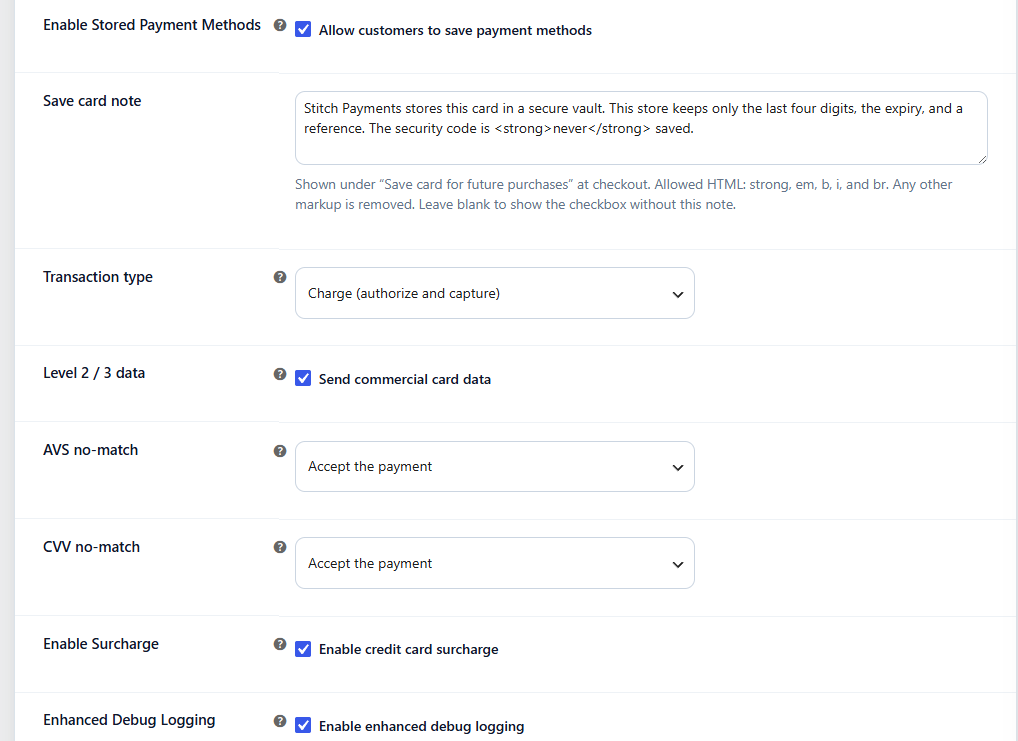
Each setting has the same choices:
- Accept the payment — the default. Checkout completes normally.
- Hold the order for review — the order moves to On hold and an order note explains the mismatch. In Charge mode the card has already been captured. In Authorize only mode the card is still only authorized.
- Void and decline checkout — Stitch voids the authorization and the checkout does not complete. The customer is not told that a void succeeded. If the void itself fails, the merchant order note says so.
If both checks fail and one of them is set to void, the payment is voided.
What counts as a mismatch
Only a CardPointe response code of N is a no-match.
Partial AVS results (for example, ZIP matches but the street does not) are accepted. A missing or unavailable code is also accepted. A missing CVV is not treated as a failure.
The response codes are stored on the order as _stitch_avs_response and _stitch_cvv_response.
Where the check runs
The policy runs when a customer pays at checkout, and when a pay-upon-release pre-order verifies a new card for $0.
It does not run on WooCommerce Subscriptions renewals or on the charge that releases a pre-order. Those payments are started by the store and do not include a fresh security code.