Level 2 and Level 3 card data
Sign upfor a Stitch Payments account.
Since 0.5.4. Authorization and capture can include the extra fields corporate and purchasing cards need for Level 2 and Level 3 interchange.
The amount sent to CardPointe is the WooCommerce order total, minus a Credit card surcharge fee when that fee is on the order. CardPointe adds that surcharge itself. These commercial fields describe the order. They do not add a surcharge or any other fee.
Turn it on
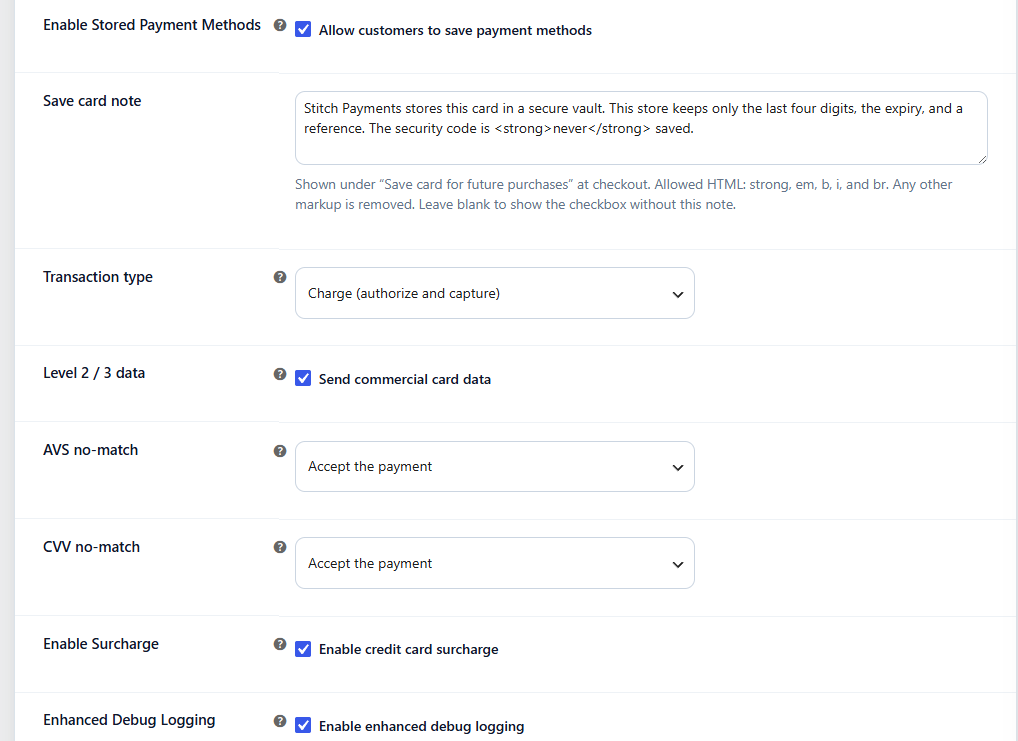
In WooCommerce → Settings → Payments → Stitch, under Other settings:
- Leave Level 2 / 3 data checked (it is on by default), or clear it if the merchant account is not boarded for commercial data.
- Save changes.
Set the store postcode under WooCommerce → Settings → General. That value is sent as the ship-from ZIP.
What is sent
| Field | Source |
|---|---|
| Tax exempt and tax amount | Order tax. A taxed order is not exempt and includes the tax. An order with no tax is sent as exempt, and the tax amount is omitted |
| PO number | Order number, letters, numbers, and hyphens only, up to 25 characters |
| Freight | Shipping total, when it is greater than zero |
| Ship-to ZIP | Shipping postcode, or the billing postcode when shipping is empty |
| Ship-from ZIP | Store postcode |
| Order date | Date the order was created |
| Line items | Product name, quantity, unit cost, discount, net amount, tax, unit EA, and SKU |
Line descriptions are shortened to 50 characters. SKUs are shortened to 12 characters.
Capture of an authorize-only payment sends the same commercial fields again when the setting is on.