WooCommerce payment features
Sign upfor a Stitch Payments account.
Cards accepted




Payment processing
| Feature | Description |
|---|---|
| Credit card gateway | Accept cards via Stitch / CardPointe (USD stores) |
| Test & production | Separate credential sets with a test mode toggle |
| Hosted tokenizer | Card number captured in a secure iframe |
| Classic checkout | Full payment form with validation and surcharge notices; guests can pay with a new card |
| Blocks checkout | Native WooCommerce Blocks payment method integration; guests can pay with a new card |
| Authorize / capture | Charge immediately (default), or authorize only and capture later from the order screen — see Authorize and capture |
| Payment safety | Charges, refunds, and profile saves are attempted exactly once — never blindly retried. Interrupted authorizations are looked up at the processor and recovered if approved. If that lookup finds no approved transaction, the authorization is voided by order ID |
| Clear decline messages | CardPointe declines (expired card, bank decline, call for authorization, and related responses) show a clear reason at checkout instead of a generic error |
| Level 2 / 3 data | Tax, freight, PO number, and line items are sent with authorization and capture for commercial cards — see Commercial card data |
| Address and CVV checks | Optional hold or void when CardPointe reports an AVS or CVV no-match — see Address and CVV checks |
Saved payment methods
- Customers can save cards at checkout or from My Account → Payment methods (logged-in only; guests pay with a new card)
- Adding a card from My Account checks it with a $0 authorization. The CVV is used only for that check and is never stored
- Saved cards appear as radio options on return visits
- Saved methods are verified to belong to the paying customer before any charge
- Subscription renewals reuse stored tokens and are sent as recurring charges
- Removing a saved card also deletes that card's account at CardPointe
- When Card Account Updater is enabled on the merchant account, saved cards are refreshed daily (expiry and last four), or removed if the brand reports the card closed or invalid
- Toggle Enable Stored Payment Methods in gateway settings
Checkout display
Customize how the payment form looks without code:
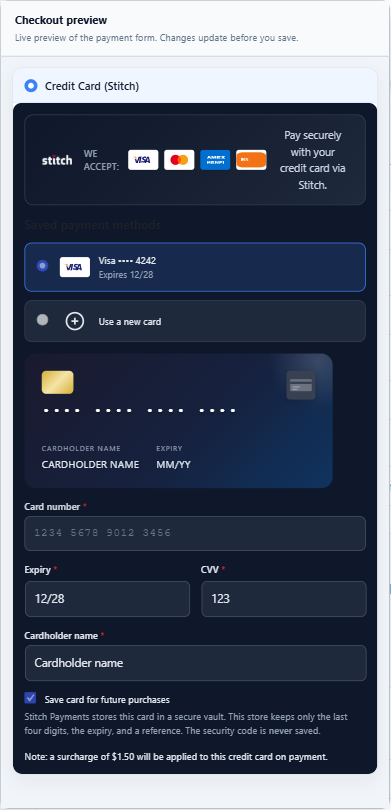
- Checkout style presets — switch the form between Default, Minimal, Compact, and Dark looks, with an optional accent color and custom CSS on top
- Show or hide Stitch logo, accepted card icons, and payment description
- Upload a custom checkout logo URL
- Override field labels (card number, expiry, CVV, cardholder name)
- Optional card preview animation
- Live admin preview updates as you change settings (sticky panel on desktop)
- Auto-advance between card fields when each value validates (card number → expiry → CVV → name)
The Dark preset in that preview. The $1.50 surcharge line and the Visa ending 4242 are samples in the preview, not a live rate or a real saved card.
Surcharge disclosure
When enabled, customers see the processing fee beside the card fields before they pay. That amount is also added to the order as a Credit card surcharge fee line.
Configure:
- Enable Surcharge toggle. The percentage is the rate boarded on the CardPointe merchant account. The plugin does not store its own rate.
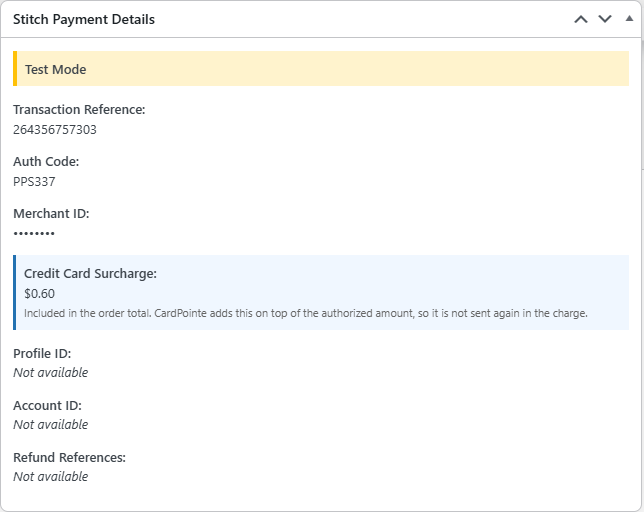
On the order, the fee is listed in Stitch Payment Details. CardPointe adds it on top of the authorized amount, so the plugin does not send it again in the charge.
Subscriptions
- WooCommerce Subscriptions renewal processing
- Scheduled renewal payments via saved payment methods
- Payment method change support in admin
Pre-Orders
- WooCommerce Pre-Orders: upfront pre-orders charge at checkout
- Pay-upon-release stores the card, then charges that saved profile when the pre-order is released
- See Stored payment methods
Refunds and voids
- Full and partial refunds from the order admin screen
- An unsettled charge can be voided for the full remaining amount. A partial refund waits until the transaction has settled. The refund button stays available; the order meta box warns while the order is still inside the settlement window.
- Authorize-only orders: capture by moving the order to Processing or Completed; void the hold by cancelling
- Refund reference tracking on orders
Admin experience
- Branded settings page with status pills (enabled/disabled, test/live)
- Tabbed Test and Production API credentials
- Grouped sections: Checkout display, API credentials, Other settings, Data retention
- Order meta box with transaction IDs and refund references
Data and privacy
- Card numbers tokenized via CardPointe hosted iframe — not stored on your site
- CVV never written to the database; tokenizer tokens removed from orders after payment processing
- Customer details appear in payment logs only when Enhanced debug logging is enabled
- Configurable uninstall cleanup; order transaction records retained for accounting
- In-admin Data retention reference for your privacy policy
See Data and privacy for the full breakdown.
Compatibility
- WordPress 7.1.2 and WooCommerce 11.1.2
- WooCommerce HPOS / custom order tables
- WooCommerce Cart & Checkout Blocks
- Elementor checkout layouts (when standard WooCommerce payment fields are used)
See Checkout display for branding options and Developers → Elementor for page-builder notes.