Save cards in WooCommerce
Sign upfor a Stitch Payments account.
Let returning customers pay faster by saving cards to their account.
Enable saved cards
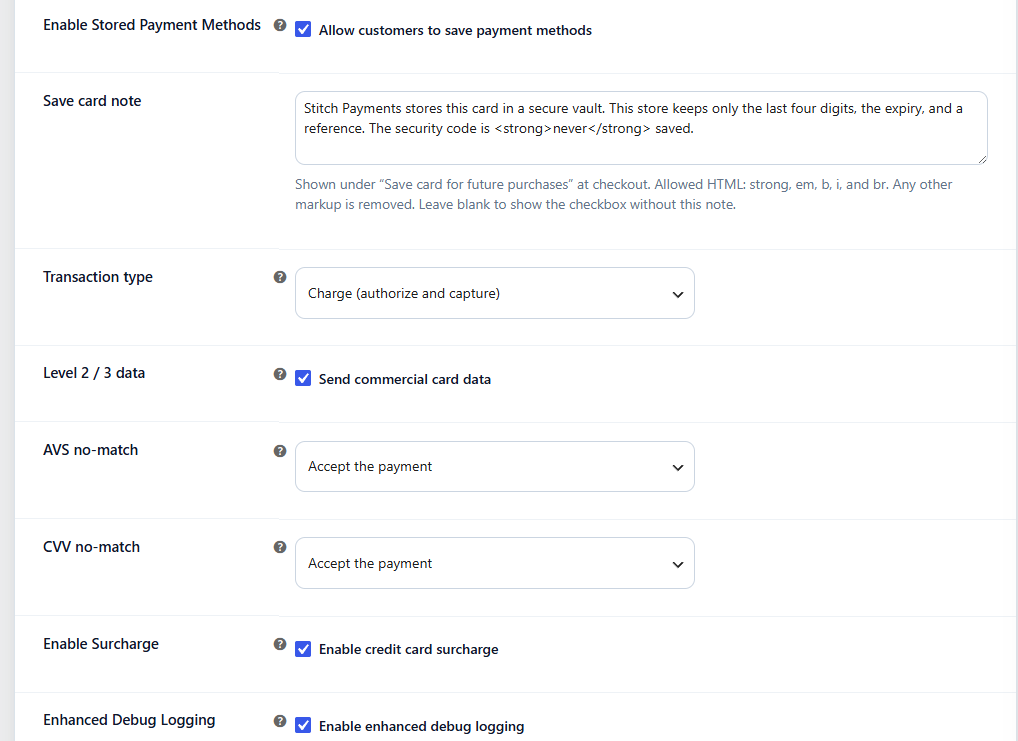
In WooCommerce → Settings → Payments → Stitch, under Other settings:
- Enable Enable Stored Payment Methods.
- Save changes.
Customers will see a Save card for future purchases checkbox when paying with a new card while logged in.
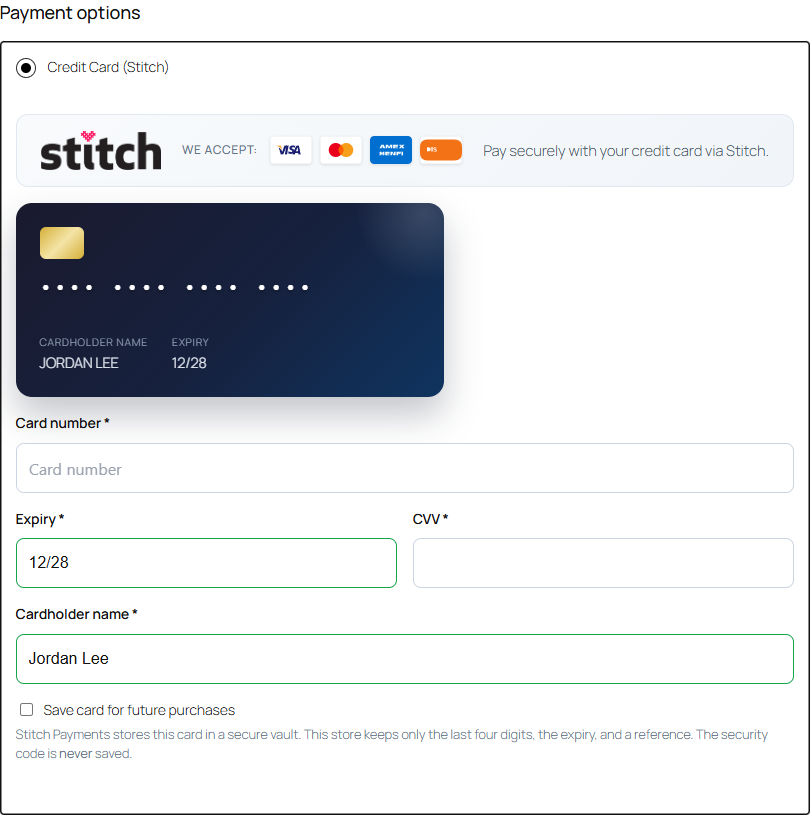
The card is saved only when that box is checked. A note under the checkbox explains that Stitch Payments stores the card in a secure vault and that the security code is never saved. Edit that note under Save card note while stored payment methods are enabled. Allowed HTML is strong, em, b, i, and br. Guests can still pay with a new card; they will not see saved methods or the save checkbox.
Customer experience
At checkout
Logged-in customers with saved cards see a list of cards on the Stitch payment form. They can:
- Select a saved card, or
- Choose Use a new card to enter fresh details
Saved Stitch cards always appear inside the Stitch payment method — on both classic and Blocks checkout — rather than as separate top-level payment options. This keeps the surcharge disclosure visible whenever a saved card is selected.
My Account
Customers manage saved methods under My Account → Payment methods:
- View saved cards
- Add a new payment method
- Remove cards they no longer need. Removing a Stitch card also deletes that card's account at CardPointe. Other cards on the same profile stay stored.
Add payment method does not place an order. Stitch checks the new card with a $0 authorization, then saves the CardPointe profile on the customer's account. The security code is sent only with that check and is not stored. The customer must be logged in, and Enable Stored Payment Methods must be on. A declined card is not saved.
Using Stitch alongside other card gateways
Stitch coexists with other payment gateways (WooPayments, Stripe, bank transfer, cash on delivery, and so on) without conflicts:
- Checkout options — every enabled gateway appears in the payment options list as usual. Only saved Stitch cards are moved inside the Stitch payment method; other gateways' saved cards still appear wherever those gateways display them (for example, as WooCommerce's top-level saved-card options on Blocks checkout).
- Default selection — if a customer's only saved card is a Stitch card, checkout preselects the first enabled gateway rather than silently preselecting the hidden card.
- My Account — Payment methods lists saved cards from all gateways, including Stitch.
- No data crossover — Stitch payment tokens, order metadata, and the surcharge are all scoped to Stitch. An order paid with another gateway never records a Stitch surcharge (see Surcharge disclosure).
One shopper-experience note: running two card processors at once means customers see two "pay by card" options. Most merchants enable a single card gateway, or set distinct titles (for example "Credit card (Stitch)") to avoid confusion.
Subscriptions
WooCommerce Subscriptions renewal orders require a reusable payment method. When subscriptions are enabled, saved tokens are used for scheduled renewals. Those renewals are sent to CardPointe as recurring charges. A pay-upon-release pre-order is still a one-time charge on the saved profile.
A renewal charges only the card assigned to that subscription. If the subscription has no card, the renewal fails and WooCommerce Subscriptions asks the customer to pay, instead of the plugin choosing one of their other saved cards. A card saved in Test Mode is never used in live mode, and the reverse.
Since 0.8.0, a subscription's card can be changed three ways:
- Customer: from the subscription page in My Account, using Change payment. The new card is verified with a $0 authorization and no payment is taken. If your address or CVV check is set to void and the new card fails it, the card is rejected and the subscription keeps its current card.
- Store manager: on the subscription's edit screen, by changing the Stitch profile ID and Stitch account ID. Both may contain only letters, numbers, dashes, and underscores.
- Automatically: when a failed renewal is paid by the customer with a different card, that card becomes the subscription's card.
When the merchant account has Card Account Updater, saved profiles are enrolled. Once a day the plugin reads those updates and refreshes the expiry and last four on the saved card, or removes a card the brand reports as closed or invalid.
Pre-Orders
Since 0.5.4. With WooCommerce Pre-Orders active:
- Charge upfront — checkout charges the order total, the same as any other Stitch payment.
- Pay upon release — checkout does not charge the order total. A logged-in customer verifies a new card with a $0 authorization, or selects a card already saved on their account. When you release the pre-order, Stitch charges that saved profile for the order total. That release is a one-time charge. A subscription renewal is sent as a recurring charge.
Guests cannot complete a pay-upon-release pre-order; they are asked to log in. A release with no saved card, or a decline from CardPointe, marks the order failed and adds an order note. Address and CVV no-match actions apply to the $0 check at checkout. They do not apply to the release charge.
Data and privacy
Saved cards are standard WooCommerce credit card tokens with CardPointe profile and account identifiers — not full card numbers. CVV is never stored, and neither is the cardholder name.
Each saved card records its brand (Visa, Mastercard, Amex, Discover), last four digits, and expiry for display. The brand comes from CardPointe's response when the card is saved; if the response omits it, the plugin derives it from the secure token (since 0.4.0), so the correct card logo appears at checkout and in My Account.
Each customer has one CardPointe profile per environment and merchant. When they save another card, it is added to that profile instead of creating a second one. Customers who saved a card before 0.8.0 keep their existing profile.
Before a saved method is charged, the plugin verifies that the profile and account identifiers belong to the paying customer's own saved tokens — one customer's stored card can never be used by another account.
See Data and privacy for tokenization, order metadata, logging, uninstall options, and privacy-policy guidance.
Troubleshooting
| Issue | Check |
|---|---|
| Save checkbox missing | Enable Stored Payment Methods is on and the customer is logged in (guests never see the checkbox) |
| Saved cards not listed | Customer has card tokens for gateway stitch saved in the current environment (Test or Live) and under the current merchant ID, with profile and account IDs present |
| A new card was not saved | A card is saved only when CardPointe returns a card type, last four, and expiry for it |
| Guest cannot use a saved card | Expected — guests pay with a new card only. Saving and reusing cards requires an account |