Credit card surcharge in WooCommerce
Sign upfor a Stitch Payments account.
Stitch Payments can inform customers about credit card processing fees before they complete payment.
Enable surcharge disclosure
Under Other settings in gateway configuration:
- Enable Enable Surcharge.
- Save changes.
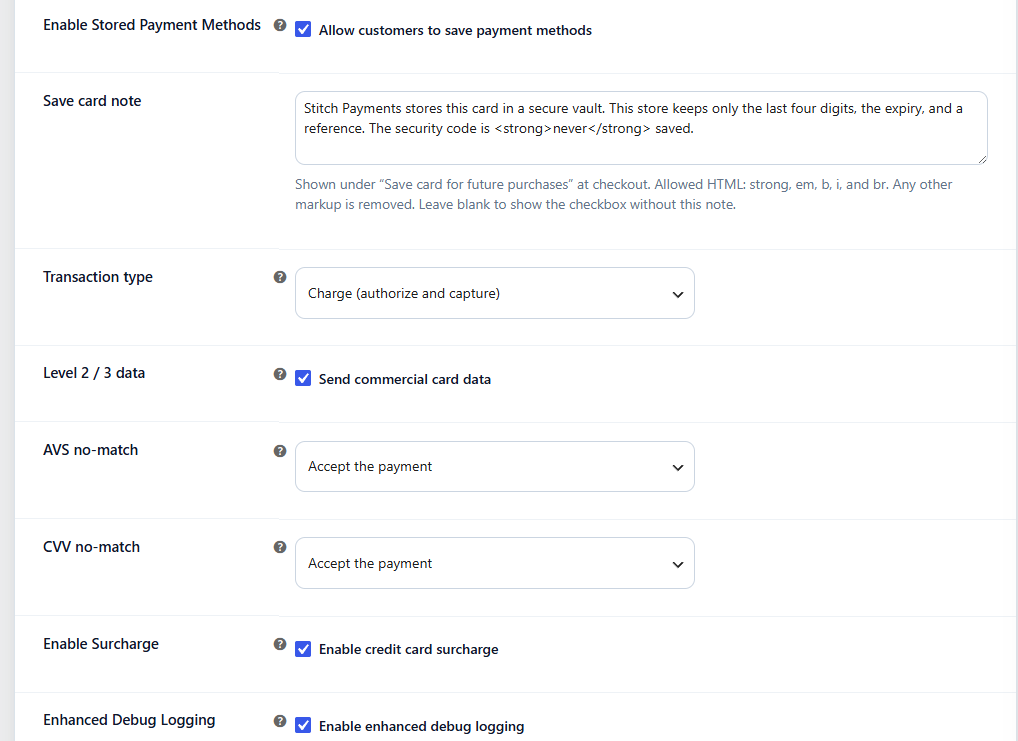
The fee percentage is the rate boarded on the merchant account at CardPointe. The plugin uses the amount CardPointe returns. It does not have its own rate setting.
What customers see
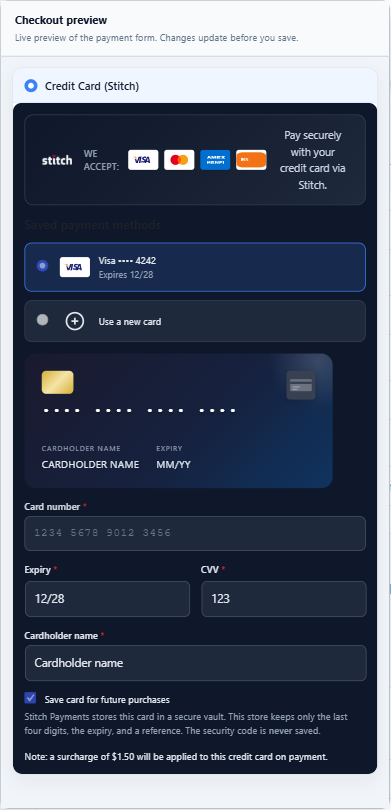
When a valid card is entered (or a saved card is selected), the checkout form can display:
- A calculating message while the fee is looked up
- A notice with the estimated processing fee, or
- A message that no fee applies to the card used
After CardPointe returns a surcharge for the card, that amount is added to the WooCommerce order as a Credit card surcharge fee line. The plugin does not calculate that amount from its own rate, and it is not carried over from an earlier checkout. Checkout shows the notice beside the card fields. The order total shows the fee line.
The settings preview shows where that notice sits. The $1.50 line in this picture is a sample, so you can see the layout before you save. On the store, the amount comes back from CardPointe after the card is tokenized. The Visa ending 4242 is a sample saved card in the preview, not a live card on file.
Fee lookups for saved cards only work for the logged-in customer's own saved methods — the lookup endpoint rejects profile identifiers that don't belong to the current customer.
Order total and the amount sent to CardPointe
CardPointe applies the surcharge on top of the authorized purchase amount. The plugin adds that fee to the WooCommerce order so the order total matches what the customer pays, and leaves the fee out of the amount sent to CardPointe so it is not charged twice.
The fee is quoted on everything CardPointe will authorize: the items after discounts, item tax, shipping, and shipping tax. If the cart changes after a quote (an item, a coupon, or the shipping method), the fee is dropped and quoted again for the new amount.
Checked again when the customer pays
The fee shown while the customer typed their card is a preview. When they press Place order, the plugin asks CardPointe for the fee again, using the card actually being charged and the exact authorization amount.
- The fee matches the order: the payment goes ahead.
- The fee is different (for example the customer switched from a debit card to a credit card after the preview): the payment is stopped, the order total is updated, and the customer is asked to review it and place the order again. Nothing is charged until they do.
Each shopper can make a limited number of fee checks (20 every 10 minutes by default), because every check tells the caller whether a card is credit or debit. A developer can change that with stitch_payments_surcharge_rate_limit.
When the fee cannot be confirmed
If CardPointe cannot be reached for that final check, the payment still goes ahead so the sale is not lost, and the order is left as it is. The plugin keeps a trail so you can see if it keeps happening:
- The order gets a note saying the fee could not be confirmed, and the order meta
_stitch_surcharge_unconfirmedis set toyes. - The failure is written to the
wc-stitch-surchargelog (WooCommerce → Status → Logs). - Once 3 orders in 24 hours were paid this way, a warning appears for shop managers on WooCommerce screens. It clears by itself when the failures stop. A developer can change the number with
stitch_payments_surcharge_unconfirmed_alert_threshold, or react to each one with thestitch_payments_surcharge_unconfirmedaction.
When you see the warning, check your API credentials and CardPointe's status, then compare the fee on each flagged order with the CardPointe transaction.
Order records
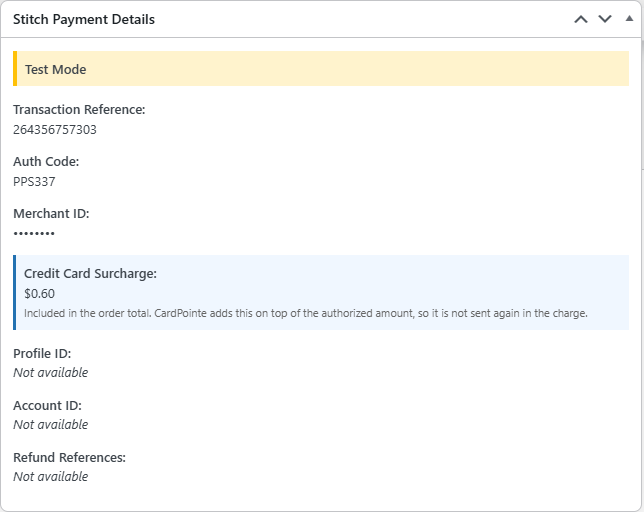
The fee line is the surcharge on the order. The plugin also stores the amount in order meta for the payment log. After a test payment, Stitch Payment Details on the order shows the fee and states that CardPointe adds it on top of the authorized amount. The merchant ID is hidden in this picture.
The disclosed fee is only ever recorded on orders paid with Stitch. If the customer calculates a fee and then switches to another payment method (for example a different card gateway or cash on delivery), the pending fee is cleared and the other gateway's order is unaffected.
Testing
- Enable surcharge and use the merchant account that is boarded for the fee.
- Complete checkout with a test card in Test Mode.
- Verify the notice appears and updates when switching between saved and new cards.